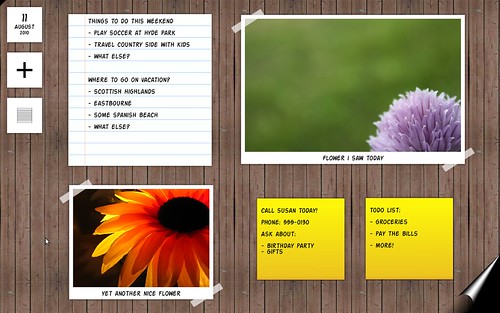
GUADEC 2010 is about to begin and, unfortunately, I will not attend it this year. But I think it’s a good time to introduce a small cool project I’ve been gradually working on in my (rare) spare time. I’d like to present you The Board.
What is The Board? It’s a space for quickly placing daily records: photos, video, audio, text, and more. Think of it as a combination of a note-taking space, a photo or video booth, photo album, sketching board, a digital diary, and (in the future) a nice way to quickly share stuff with your friends. Click on the image above to watch a video showing how the app works now.
The focus is to provide a quick, simple and visually engaging way of keeping small records of your day. I envision The Board as a sort of especial workspace in GNOME. Something that’s “always there” and is tightly integrated with the desktop. For now, it’s simply an app that always runs in full screen – so that I can demonstrate the idea more accurately.
Add to The Board. The Board can be used a quick note taking app. Someone is telling you a phone number you want to take note of? Switch to The Board, press “s” (or use the toolbox) and quickly write down the phone number. You have a favourite photo for the day? Switch to The Board, press “p” and select the photo file (similar thing for video and audio). Want to write down some ideas before you forget them? Switch to The Board, press “t”, and you have a nice lined note paper to write in. Want to record a quick video with a happy family moment? Switch to The Board, press “v”, and you can start recording the video. You got the idea. For now, I have only implemented simple text elements (lined paper and sticky note) and photo. There’s more coming (see “Next steps” below).
One page at a time. You don’t need to remove old things or “manage” the things on The Board. Once you filled the whole screen space, just create another page! Your previous content will be saved and can be easily accessed through the Pages toolbox. You don’t even need to worry about saving your content. The Board saves the latest content of your page every time your change it by editing, adding or removing things, etc.
What is it made of? The Board is built on top of bleeding edge GNOME platform. It’s written in Javascript using the GObject Introspection-based Gjs. The UI is fully written with Clutter and Mx (with some small bits of GTK+ and Clutter-GTK+). It’s a nice example of how you can do cool apps using the GNOME platform nowadays.
What’s the current state? The initial core code and framework is in place. But there are obviously tons of things to be done. The app is not even installable yet! I’m still sketching the API to implement plugins. Video and audio elements are not implemented yet. The graphic design is poor (as I did it myself using some random graphics from internet) and there are lots of open interaction design questions to be sorted out. In order to run the app for development purposes, you’ll need a full GTK+ 3 stack, and latest (as in git clone master) clutter, clutter-gtk, mx, gobject-introspection, and gjs. The official code is in gitorious now.
How can I help? If you want to hack on The Board, grab the code, build it and run it. Play with the app and bring ideas, fix bugs, implement new features, etc. Business as usual. If you’re an interaction designer, you can help by solving some of the hard questions still needing answers in terms of usability and user experience :-) On the graphic design front, I’d really like to have better graphics for all UI elements. I have to find a nice free (as in freedom) font to use in the UI. I’m temporarily using this funny freeware font. Users can help by giving constructive feedback on how we can make The Board more interesting, useful, and exciting. In any case, contact me and we can discuss how and what to do.
So, what are the next steps? As I said before, there are tons of things to be done. Here’s what I have in mind in terms of short-term and long-term roadmap.
Come up with a simple Plugin API. By plugins I mean either the implementation of new types of things to be added to The Board’s pages or new types of background – which can contain animations and react to user events by the way. For example, a background could be a wooden table with a light switch that can be turned on and off. Or the background can change colour depending on the current time of the day.
Integration with other apps. Basically, users should be able to add new things to The Board through existing apps. For example, An Add to the Board option in Nautilus when right-clicking image, video, audio, or text files. Similar thing with apps like EOG or F-Spot – an Add image to The Board option. Integration with web browsers would be nice too: saw an interesting image on a webpage? Just add it to The Board. Or maybe add your text selection as a sticky note in The Board. Still on the app integration front, I’m doing some work to integrate a Cheese dialog into The Board so that you can add photos and videos from webcam without having to switch apps.
Online experience. This is one area that I’m still unsure how to handle. My initial idea is that you can share anything in The Board pages. From a user perspective, you would just add something to The Board and click “Share”. On the server side, I’m thinking of having a WordPress instance with a plugin to present The Board’s custom types just like you see them in your desktop. i.e. sticky notes in The Board should look exactly the same in your “Board webpage”. The advantage of implement this as a WordPress plugin is that it would be installable in a large number of personal servers from day one. Tumblr is definitely the main inspiration in terms of online experience here as it offers a rich media blogging approach.
Anyway, you probably got the idea after reading this (maybe too) long blog post. If you got excited about The Board and want to help with code, graphics, design ideas, or just simple feedback, post a comment here or contact me directly. I’ll be hacking on The Board in my spare time as usual. But things can definitely move much faster if it gets more people involved. If you’re into writing simple and beautiful software using GNOME’s latest technologies, this should be a fun project to contribute to!

Hi,
I really love your idea, and hope it can be tightly integrated with the new Gnome desktop. This would work great as a kind of widget layer.
You may also think of a “book” metaphor in addition to the “board” metaphor, kind of like the MS Courier concept. If you make more addable widget types in future versions, and also encourage the use of multi-touch (for resizing, page turning) and stylus input for drawing, it would be perfect as a tablet interface.
The ability to link phone numbers, dates, and appointments kept in The Board with other programs like Evolution, or online scheduling apps, would make this a great brainstorming and collaboration tool.
This is really great work, and it looks wonderful.
Woah, cool stuff! This reminds me of an iPad app (which I’ve never used because I don’t have an iPad) from some former GNOMErs:
http://www.appigo.com/corkulous
It’s interesting to me that the organization of pages is entirely date-based. I think that makes sense, but I wonder what would be a good way to expose pages that represent continuing work. One approach might be to have the option to add titles to pages.
From watching the video, the most obvious missing feature is search. I may have to get my hands dirty and try implementing that; I have never used gjs or clutter before, and need to learn.
WoW! Impressive! This stuff is really awesome.
Kinda like Plasma shell from KDE so to say, but way more nicer and friendlier overall.
Really looking forward to this project! :-) Respect!
Reminds me somewhat of Plasma (no, I am not a KDE user, just dabble from time to time).
Anyways, it was really cool to see what could be done with Clutter and Mx. I’m excited to see the next generation user interfaces with these technologies.
Great to see you like our Plasma concept and adapted it to the toolkits used by GNOME.
I’m not part of KDE’s Plasma team, but maybe some cooperation between us and you could happen to theme and/or applet compatibility.
[...] – the GNOME way Filed under: Uncategorized — Markus @ 15:56 I just stumbled over The Board via Planet GNOME.Judging by the video it’s a bit of a mixture between Plasma Desktop (free [...]
I see a lot of potential here for a fully content-centric (or document-centric, object-centric) application-less environment. Have you thought about making the workspace zoomable (like in a ZUI)? Such a feature could make The Board a killer app, with the potential of being the primary view for all of one’s content.
Looks like a KDE Plasma consept clone. You can have photos, notes etc in the desktop or in the dashboard (separated). Make own activities for them to get them follow your place, time, work, application etc.
Very nice work man! Great to get that to GNOME as well!
This is really cool, good to see someone using Clutter/Mx and JavaScript to write such a dynamic-looking application :) This is totally what Gnome 3 should be about – dynamic and cool-looking applications that are focused around what you use them for, rather than some idea of what a UI should look like.
Looks really interesting. In some sense it looks like a subset of what plasma provides under kde.
Looks very much what KDE Workspace (Plasma) is about. Nice to see that such idea is coming to GNOME as well.
I love the look of this. I could completely see this being a brilliant new desktop for gnome, or something always a click away (like the overview in Shell). e.g. i dont need sticky notes enough to keep tomboy running, but i always end up wanting a space to write a phone number (and not forget afterwards)
I would like to be able to add a whole webpage to it. I right click -> add to board, it takes a quick (but visible) thumbnail of the website and the board shows a thumbnail with a link. Makes ideal short term bookmarking. Also, plugins for different sites so if i snip a youtube page i get a video preview
Also, telepathy integration so i can “send to x’s board” with a note attached
I’m not the biggest fan of desktop couch, but it seems like it would be very important for my board to be the same on every system i use, so syncing to a wordpress page as you suggest would do that.
[...] info | lucasr.at.mundo from → Gnome, Software, Videos ← Convierte tu blog en una app de Google Chrome [...]
Dear Nautilus: please get off my desktop so I can use this instead.
This is beautiful. I’ve been wanting it for a long time. Thank you, sir, and well done!
One thing: those tiny Rotate buttons always bother me. They tend to feel unnatural and tricky. That’s fine for tidiness, but there’s a particular warmth to casually placed things.
I realize it would probably be totally ridiculous, but maybe rotating could be integrated with dragging things. A little verlet physics simulation would do it, where you affect each of four vertices (one for each corner) differently depending on what point you are dragging the object from.
So, dragging from the exact middle would affect each vertex equally, just like dragging behaves today. Dragging from the upper right would affect the top right vertex a lot more. So, the rest would rotate to fit.
I haven’t played with the idea myself, but I have a funny hunch it _could_ make for a very neat, casual feel here. It would also put this within minutes of supporting the usual expected multitouch features ;)
Thanks for the all comments so far!
For everyone comparing The Board with Plasma: I think it’s not accurate to say they are different implementations of the same idea. The Board definitely is not about applets. It’s all about content. I’m not trying to implement yet another applet/widget system for GNOME.
For instance, I’d say that The Board is much more similar to Appigo’s Corkulous (http://www.appigo.com/corkulous) than KDE’s Plasma. Thanks Sandy for the link!
Wow this is awesome! While it is like KDE I think it might actually be a better implementation. It just feels more organic. However, I’m not sure this should be part of the desktop. (As in, leave the icons on the desktop and bring this up with a quick shortcut).
I actually think that once a certain number of these boards are created, navigating them may become difficult. I suggested earlier that you could think of a book metaphor — I think you could use that to your advantage to organize the creative content too, especially as ideas become more complex and difficult to order. Kind of like the videos I have seen for Courier, you could have an overview “library” of all the different journals you have made (work, study, different hobbies, different years, etc) From there, each journal could have a table of contents for finding different sections, and each “page” in each larger “book” would be an individual Board panel. This would allow hierarchical stacking of information more efficiently than making all boards equal.
Also, for transferring information between Boards, you could allow some kind of split screen mode. Alternatively, you could do split screen with The Board on one side, and a web browser on the other.
If you have never seen the Courier videos I am referencing, here you go:
http://gizmodo.com/5369493/leaked-courier-video-shows-how-well-actually-use-it
http://gizmodo.com/5365299/courier-first-details-of-microsofts-secret-tablet
A little clarification on what Plasma is about:
both ideas are about content. Also in Plasma the type of content that is easily directly representable is directly shown, just like this idea, just look at the notes or the photo, they look the same (even the clock, so the time can be considered a directly representable content).
A thing that we felt more and more important is the representation of the -online- content. in this case the content often becomes a long list of items, just think about the microblog applet.
But in this case some minimal “widget set” to have a bit of control on the content (like posting new items) becomes necessary and we chosen as a design and api decision to provide a coherent widget set for that.
But even then, we try to keep the “chrome” as little as possible, with the maximum amount possible reserved for the content displayed.
Probably is a decision you will face soon as well if you’ll go on representing content a bit more complex than notes or photos, like rich text, or news feeds or whatever.
That said, I’m happy that the concept is spreading ;p
very nice idea indeed, I really like this more natural approach to computing :)
now if
- the notes I create on the board would be Tomboy/… notes
- the todo lists I create on the board would be Tasque/Evolution/RTM/.. lists
- the date/appointment notes I create would be GCalendar/Evolution/… dates
- …
and all of them would be automatically saved to the respective app…
that would really save me from creating everything twice…
hope this thing flies!
regards, alex
Nice ! That about adding this to gnome-shell as a widget layer ?
Very nice work!
I already imagine how cool that would be to link calendar events to the board.
And everybody talk about this already, but doing a multi-touch (with gestures) interface for this would make it a killer app for tablets and other multi-touch devices.
I can see some use for something like this. Likely more geared to the home user, though if configured appropriately, it could be useful in a business environment as well I suppose.
An app like this is what begins to make multiple desktops and “cube” features such as in Compiz, less of a toy and more usable and that is what Linux/FOSS needs is greater/improved usability.
The post suggesting integration with existing features such as Tomboy notes and evolution todo lists, etc.. is also a good idea which reduces redundancy and makes a feature become more valuable as it has broader usability.
We at BEL Project will be watching the development of this in hopes that it becomes what it has the potential to become.
Good work.
[...] de cómo se pueden hacer interesantes aplicaciones utilizando la plataforma GNOME hoy en día. En su blog, podéis leer el artículo completo y os dejo el video para que veáis su [...]
[...] or put in a “cryogenic storage”. Or something based on Lucas’ newly announced Board. Perhaps Guadec would be a great time to discuss these things (I will not be able to attend, [...]
Tomboy integration via d-bus would be pretty easy, I’d be happy to help anyone who felt like working on that.
Perhaps all notes could be kept in a “The Board” notebook, and tagged with other metadata indicating things like whether it’s a sticky or a lined note, which page it belonged to, etc.
If the Tomboy note included a link back to the relevant page on The Board, that would be useful, too.
Though honestly, I’m not sure who would choose to use both The Board and Tomboy, assuming The Board grew a few features to make it more suitable for keeping track of your notes.
Love it, i like the natural feeling of the items and the customizability. btw, why do the pages have dates representing them, wouldn’t mini preview’s or custom names be better? (or both?). just my 2 cents. great job btw, can’t wait for official release.
Wow, that looks pretty sweet.
I’m not sure about widget rotation though. Its kinda cool that you can do it with clutter and it make for some wow factor, but I don’t think its actually very useful and it clutters up the maintenance widgetry.
@Alex, yeah, this is just an initial experiment. I’ll probably remove rotation so that I can use that corner for something more useful (a share button or something). Let’s see.
Wow, i would certainly welcome some of that KDE flexibility into GNOME!
I am not much of a programmer, but would you not be quicker to just implement Plasma into GNOME? That should also take care of the “next steps” you have left.
Hope to hear more of gPlasma!
Hey, what font do you use for this website?
I liked it a lot.
[...] [...]
There’s not only Corkulous as an iPad app like this already, but also Web-Apps like http://www.spaaze.com or http://www.linoit.com
@DREMA, It’s Universalis ADF as noted here: http://lucasr.org/about
@Sandy, yes, the entirely date-based approach for organizing pages is not ideal because it would be hard to find previous content by only looking at dates. It’s just an initial implementation. So, adding titles to pages is definitely something to consider. It should be quite easy to implement that in the page model.
@Brian, I am considered something similar to what you suggest here (having different boards with multiple pages) but I felt that this would add unnecessary complexity to the app. Maybe just having titled pages is good enough for a start. Depending on how people start using The Board, we might end up implementing different boards, each with their own pages.
@Marco, I still think The Board and Plasma are different because things like microblog and clock applets don’t make much sense in The Board. I honestly never looked at Plasma in detail but my impression is that Plasma users most likely talk about applets and widgets most of the time while The Board users will probably simply talk about pages, notes, photos, videos, etc.
@Stefan, Nice, thanks for the links.
[...] foi apresentado um conceito do que pode vir a ser o recurso equivalente do KDE ou Mac para Gnome: The Board, uma ferramenta simples e rápida para gravar fotos, vídeos, áudio, texto e [...]
[...] proyecto The Board, con el que quiere realizar al equivalente a lo creado para KDE 4 de forma que The Board, se convierta en una herramienta dentro de la interface gráfica simple y rápida para grabar [...]
[...] Shared Introducing The Board | lucasr.at.mundo. [...]
[...] document.getElementById("fb-root").appendChild(e); }()); Το The Board είναι μια αρκετά όμορφη εφαρμογή για το GNOME που [...]
[...] you now know about The Board and my short-term and long-term plans for it. Thanks everyone for the positive energy and the nice [...]
I totally agree with einalex.
The Board has great potential, but it needs some improvements.
At the moment it looks to me like a 13 year old girl’s diary, but if:
- the notes I create on the board would be Tomboy/… notes
- the todo lists I create on the board would be Tasque/Evolution/RTM/.. lists
- the date/appointment notes I create would be GCalendar/Evolution/… dates
- every page would represent one day
- there would be a page (calendar) browser and the possibility to search through notes, todos and calendars…
…well, that 13 yo girl’s diary would become the perfect transposition of a real agenda.
Hi Lucas, great idea, keep doing cool stuff!
Nice to see such good thing in Gnome. Going to install Linux back to my laptop :)
Thanks for sharing!
@Matteo, The whole idea started with a desire to do a digital diary for my new-born daughter. I don’t think the current UI is girly, but I see no problem if that’s the case :-) More seriously: don’t pay too much attention to the current graphic design because this is simply something I made up myself – and I’m not a designer. I hope some real designers will jump in soon to help me on this front.
As for the integration with other apps (Tomboy, Tasque, Evo, etc), those are things that I honestly haven’t thought out yet. For instance, my initial impression is that people will not want to use both Tomboy and The Board for note taking. They would choose one or the other – Tomboy will probably always be a more advanced note taking app than The Board. But I might be proven wrong. Let’s see.
Anyway, I’m focusing on getting a solid core in place to then move on to integration with other apps and other important features.