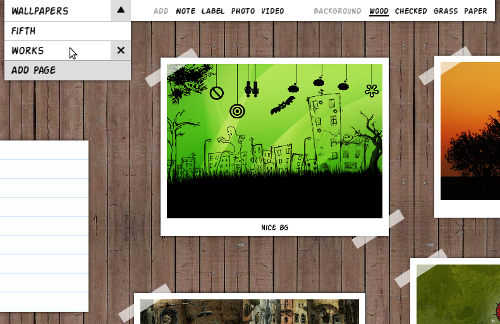
You only actually validate your ideas once you start implementing them for real. This couldn’t be different with The Board. When I first started sketching the first UI prototypes for The Board I wasn’t entirely sure about the best interaction model for the use cases I had in mind. Now things are starting to become more clear.
In terms of design goals, The Board should be optimized for:
- Adding things (note, video, photo, etc) to the current page.
- Editing things (note, video, photo, etc) in the current page.
- Switching among existing pages.
- Changing the title and looks of the current page.
- Adding and removing pages.
The current expandable toolboxes—the intro video shows them in action—fail to make those tasks simple and direct because they require at least two clicks for any task: clicking to expand then clicking on desired action. Furthermore, they might be slightly unintuitive at first because they rely solely on non-conventional icons. Finally, the expanding/collapsing animations add too much movement on the screen which is a bit distracting. So, yes, the expandable toolboxes are flashy. But not so good and usable in practice.
The new The Board toolbar is an attempt to provide more direct access to some of tasks listed above. It might be more conventional than the toolboxes—which is not a problem actually—but it’s simpler, faster and more focused on the core features of the app. Right now it uses labels with no icons but that might change in the future. I won’t use icons without labels as this is generally bad usability-wise. This new toolbar is part of a wider interaction model that I’ll be implementing soon. Click on the image above to see a video demonstrating how the new toolbar works.
The new toolbar also demonstrates a new feature: the ability to name pages. I initially thought having a date-oriented list of pages would be a nice idea but that makes it hard to retrieve previously created items. Having pages with titles allow easy access to any page and induce a more topic-oriented usage—which is a nice thing.
I still have a few open questions about the new toolbar. Especially when it comes to scalability. For instance, I’m sure yet how to make it scale nicely for a bigger number of pages, things, and backgrounds. No problem. For now, I’m focused on getting a simple set of core features working well enough for dogfooding.
It would be great if I could get some constructive feedback from UI design people on the new toolbar. I also need a hand from a graphics designer to make The Board look generally prettier and more polished. Any help on those areas is welcome.

Looks very nice. Some ideas: It would be very cool if everything could be undo-able (like I think it’s a goal in the gnome-shell). The select background is not optimal for a lot of backgrounds, if you have more than 10 the names will fill the whole toolbar, maybe a slide out list which is scrollable?
Keep the nice work :)
Maybe the toolbar should auto-hide if it’s not needed.
I think having the items to add quickly is much better, and I agree that the animations were more distracting than helpful. The page turn animation now is much more non-intrusive but still helpful.
I’m not sure the wallpaper change needs to be one click. This is offset by the small size of the toolbar though.
It might be interesting to look at this from a touch interface point of view too. I can easily see this as being an interesting interface on a tabletop, a tablet, or even a Microsoft Courier (if someone ever revives the form factor).
You’re packing a lot of functionality into the page selector without any real hinting/affordances visible to the user that it exists. For example I would not have guessed I could rename the page just by clicking what looks like a dropdown menu. The delete item showing up on hover is helpful, I wonder if you can see an easy way to add editing the name in the same manner, so you don’t have to switch to that page to rename it?
Thanks for sharing – looking forward to seeing more.
Where were these use cases you wanted to optimize for? I think this is an interesting concept, but I’m not clear on its use cases.
I love the real world feel of the pages, *please* try to maintain that in future.
[...] un giorno inserirsi ufficialmente nei nostri desktop. Ora prende un pochino di concretezza con l’aggiunta della toolbar, e qualche chiarimento su quello che in futuro dovrà essere implementato nella scarna lista delle funzionalità! [...]
Hey, an idea for the board, how about adding to it the pasteboard functionallity meego has in the pasteboard panel?
http://help.meego.com/netbook/pasteboard/pasteboard-panel
That would indeed be very usefull and I think it can fit in the board idea. Maybe an item which is a list of the most recent copy-pasted item via control-c/control-v
thanks!
@anonim, Sounds interesting. Are there any UI mockups or working prototypes of the pasteboard?
@Kirk, I agree the pages section of the toolbar is a bit overloaded with features. I think that adding a few tooltips might give enough hints of how the UI behaves. Mockups, ideas, suggestions are welcome.
As for the use cases, I listed some in The Board’s intro post.
@lucas: I found from moblin (previous iteration of meego):
http://moblin.org/documentation/moblin-netbook-intro/how-get-around-moblin-netbook-ui/pasteboard-panel