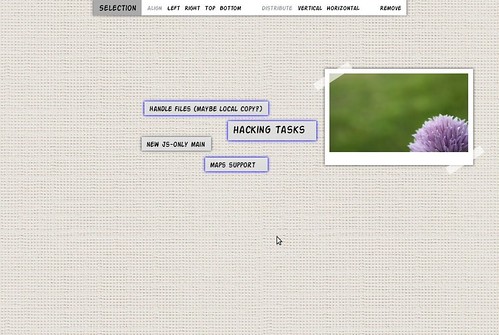
Since I started dogfooding The Board on a daily basis, it became clear to me that not having a simple way to arrange multiple elements in the page is quite annoying. If you wanted to arrange multiple elements in a specific area of the page, you’d end up having to move each element separately, one by one. Argh! This is why I decided to focus on an initial set of features targeting this specific issue for the upcoming release.
You can now select, move, align, distribute, and remove multiple elements in a page. Click on the image above to see a video demonstrating the new features. Selection can done in three ways: the usual dragging from background to start selecting a region of the page, Ctrl+clicking on elements, or using Ctrl+A to select all elements in the page.
Once more than one element is selected, a context toolbar slides in presenting all available operations for the selection. I’m following the same obviousness, clarity, and consistency principles I’ve discussed before. The available operations for any app state are always visible and easily accessible. No need to dig around to find out what to do.
As usual, feedback on the design decisions are more than welcome. So, what’s next? I’ll be fixing a few critical bugs and then roll a new release. I’ve been pestering distro guys to create packages for The Board. I’ll hopefully be announcing the next release with links to distro packages.

Great! This is definitely a must for a note-taking app. Sadly not all of them implement this =(
I would love to see this integrated into Gnome Shell like you did in the mockup on flickr: http://www.flickr.com/photos/lucasrocha/5169105323/
It would be also a good idea to make this a bit more “social” by adding the ability to share/reblog items. Say you have a photo on the board and want to share it, just click the share button and select your favorite social network/blog and it gets uploaded.
Keep up the good work!
@Cooper, Thanks for the suggestions. For now, I’m focusing on the basic foundation and features before moving on to integrating it with GNOME Shell. But it’s definitely on my plans.
As for the social features, the online experience—including syncing The Board’s data to the cloud and sharing capabilities—are part of my long-term plans. But, again, I want to have a solid set of core features before moving my focus to new major areas.
Looks like a job for multitouch !
can’t wait for the distro packages, this is application is going to improve my productivity by managing and cultivating ideas.
[...] Selection in The Board Since I started dogfooding The Board on a daily basis, it became clear to me that not having a simple way to arrange multiple elements in the page is quite annoying. If you wanted to arrange multiple elements in a specific area of the page, you’d end up having to move each element separately, one by one. Argh! This is why I decided to focus on an initial set of features targeting this specific issue for the upcoming release. [...]
Wow, the animations look very nice! Congratulations on a very good job. :)
[...] Select, move, align, distribute, and remove multiple elements [...]